
Most marketing stacks in healthcare were never chosen. They accumulated. Someone signed up for an email platform, a previous agency added call tracking, a booking widget came with the website, and three years later the practice pays for seven things, uses four, and cannot say what any of them proved.
This guide lists the healthcare marketing tools worth knowing about, grouped by the job they do, with a side-by-side comparison of the five most practices end up weighing. It also answers the question that decides most of it in healthcare and that general roundups skip entirely: whether the company behind the tool will take legal responsibility for patient information.
Naming a tool here is not an endorsement, and it is not a statement that the tool is suitable for patient data. Compliance details were checked in November 2026 against each vendor’s own published terms. Vendors change their positions, so confirm before you sign anything.
Why most healthcare marketing tool lists are not much help
Because they are written for every industry at once, then given a healthcare headline. The marketing tools for healthcare that get named are the same ones recommended to restaurants and law firms, and the single constraint that actually governs what a medical practice can use is missing entirely.
The lists below name plenty of tools, because you asked what exists and it is a fair question. But the useful decision is narrower: what job are you trying to get done, what is the smallest thing that does it, and will the vendor stand behind patient information if it passes through their system.
How to choose healthcare marketing tools
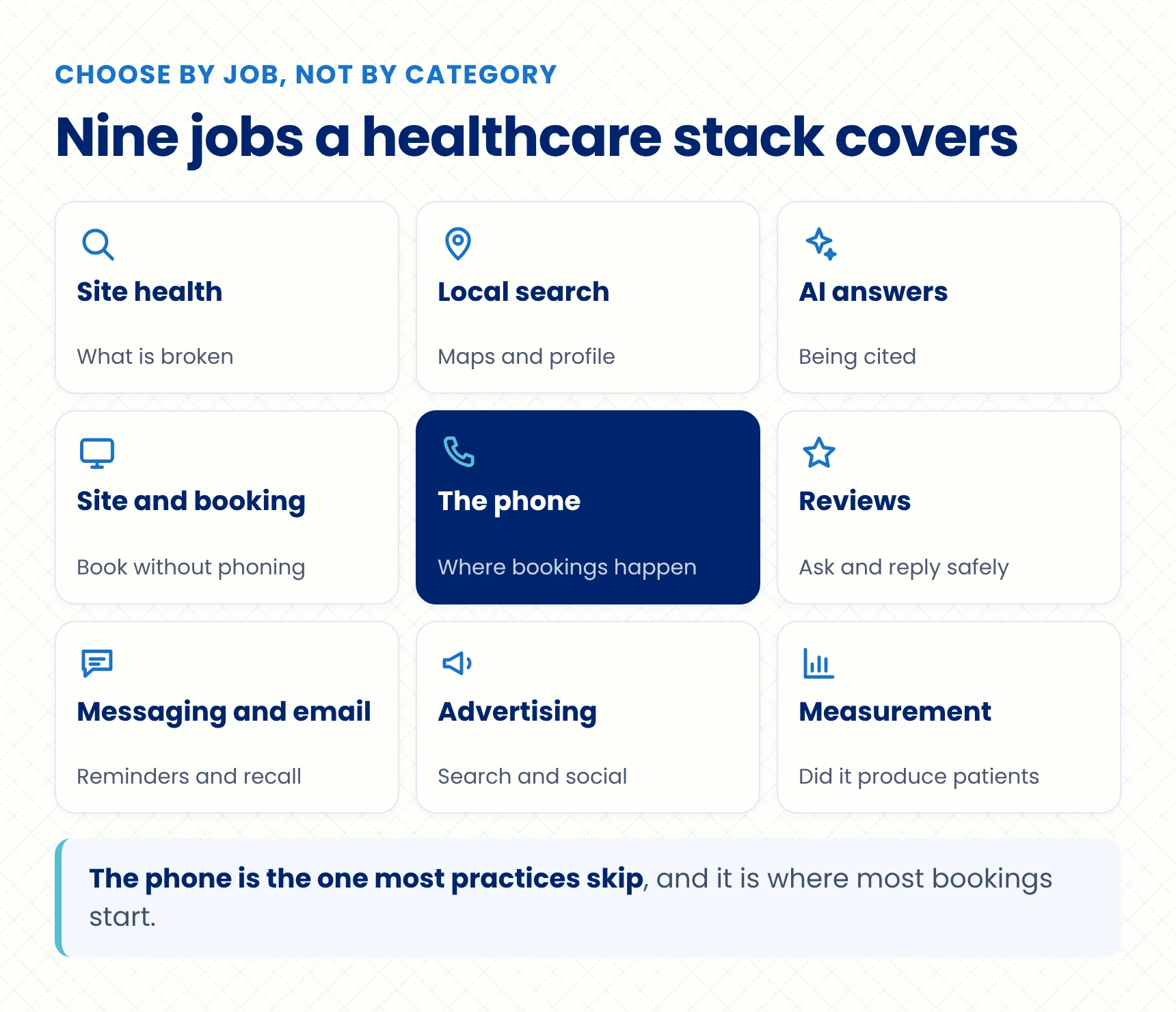
Start from the job, not the category. “We need a CRM” is a category. “We need to know which enquiries turned into booked patients” is a job, and it might be solved by your practice management system and a spreadsheet for another year.
Question five is the one people skip, and it is the reason stacks grow but never shrink. Software is easy to buy and socially awkward to cancel, especially when somebody championed it.
Before anything else: will the vendor sign a BAA?
If your practice is a covered entity and a tool will handle patient information, the vendor becomes a business associate, and you need a signed agreement with them. No agreement means that tool is off the list, however good the software is.
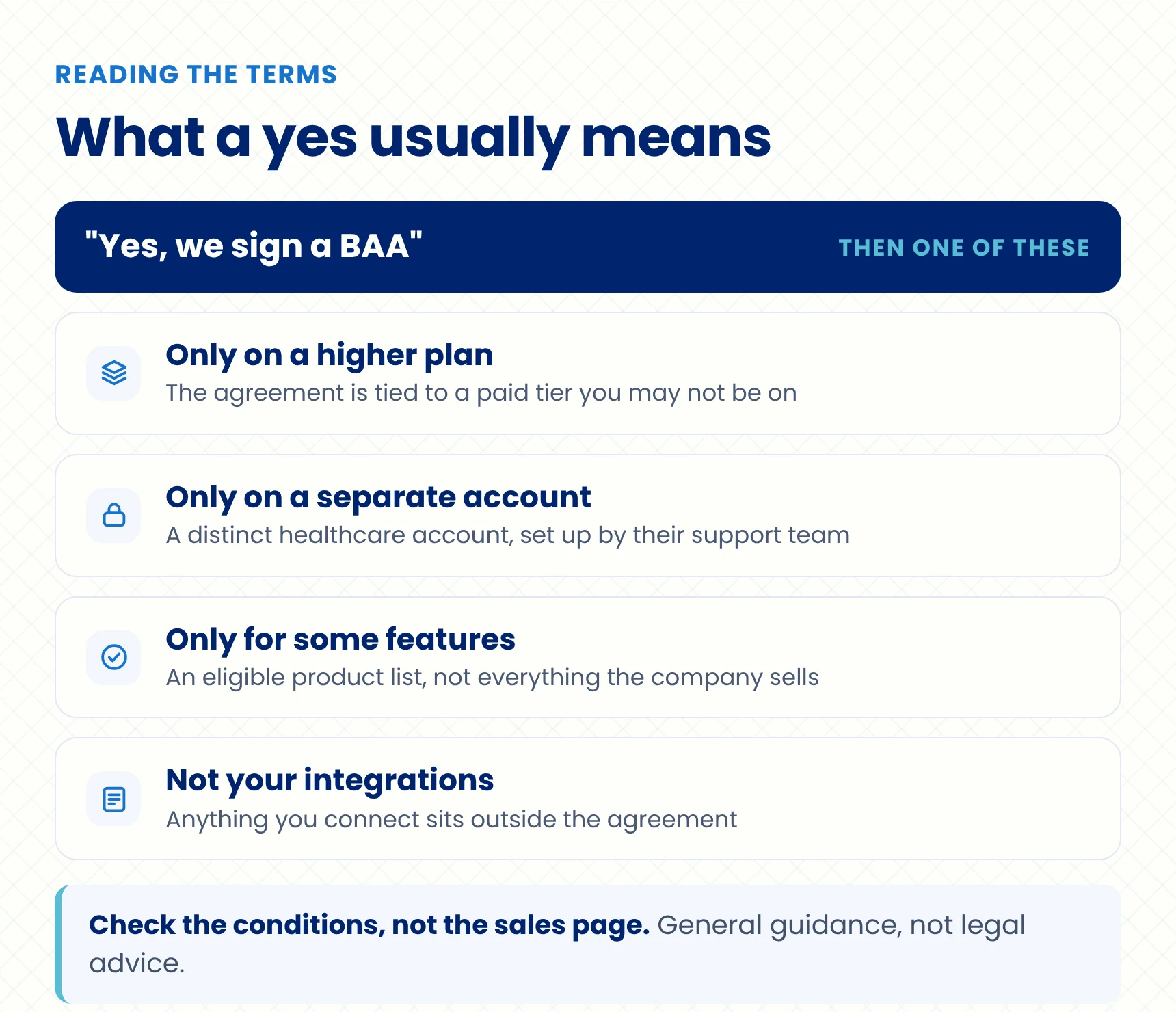
What surprises most people is that “yes, we sign BAAs” is the beginning of the conversation rather than the end. Every vendor that says yes attaches conditions, and the conditions are where practices get caught.
Google is a clear example. It will enter into agreements covering named Google Cloud and Google Workspace services, including Gmail and Google Drive, and it tells customers to disable unsupported services when handling patient information. Google Analytics is not on that list at all, which catches out practices who assume one Google agreement covers everything with a Google logo on it.
The conditions usually take one of four shapes. The agreement is only available on a higher plan. It requires a separate account from your normal one. It covers only some of the vendor’s features. Or it stays silent on the integrations you were planning to connect, which puts those outside the agreement entirely.
Comparison: the five tools practices weigh most often
Side by side, with each company’s published position on business associate agreements. Checked November 2026. General information to start your own check, not legal advice.
| CallRail | Twilio | HubSpot | Mailchimp | Google Analytics | |
|---|---|---|---|---|---|
| Main job | Call tracking | Text and voice infrastructure | CRM and pipeline | Marketing email | Website measurement |
| Who it suits | Practices where the phone drives bookings | Groups building their own messaging | Long decision cycles, several sites | Newsletters to people who opted in | Almost everyone |
| Agreement available | Yes | Yes | Yes | Not offered | No |
| Conditions attached | Separate healthcare account on a healthcare plan | Security or Enterprise Edition, eligible products only | Sensitive Data Terms, authorised features only | None stated | None available |
| What to watch | Integrations passing data onward are restricted | The edition requirement is a real cost step | Third-party integrations sit outside the agreement | Keep patient-specific content out of it | Keep it off booking and portal pages |
| Where they say it | CallRail support documentation | Twilio HIPAA page | HubSpot legal terms | Mailchimp standard terms | Google Analytics help centre |
Read the pattern rather than the columns. Tools built for regulated industries tell you exactly what is covered. Tools built for everyone put the responsibility back on you in a single sentence. Neither is wrong, but only one of them belongs near patient information.
Whatever you conclude, write it down once and reuse it. A short record of which vendors you checked, what they said and when becomes the backbone of your healthcare marketing compliance work, and it saves repeating the exercise every time somebody suggests a new product.
Tools for site health and SEO
Start here, because almost every practice has something broken that costs more than any new subscription will earn. Broken booking forms, pages that take nine seconds to load on a phone, and pages search engines cannot read are all common and all fixable.
- Google Search Console. Free. Shows what search engines see, which pages are indexed and which are failing.
- Google PageSpeed Insights. Free. Measures loading on a phone rather than on a fast desktop.
- Screaming Frog. Desktop crawler for technical checks across a whole site. Free for small sites.
- Semrush. Keyword research, rank tracking and site audits in one subscription.
- Ahrefs. Strongest on backlinks and competitor research.
- Moz. Rank tracking with a reasonable local search toolset.
Most practices need the two free ones and nothing else. A paid platform earns its place when somebody is working on search weekly and needs to show what changed.
Tools for local search and listings
For most practices this is the highest return work there is, and the main tool is free. Your Google Business Profile decides whether you appear in the map results, and it is the first thing a patient sees.
- Google Business Profile. Free. The single most important listing you own. Complete every field and keep hours accurate.
- Bing Places. Free. Smaller audience, but takes minutes and feeds other services.
- Apple Business Connect. Free. Controls how you appear in Apple Maps, which matters more than most practices assume.
- BrightLocal. Local rank tracking, citation checks and review monitoring, priced for smaller businesses.
- Whitespark. Citation building and local search auditing.
- Yext. Listings management across many directories at once. Built for multi-site groups.
Treat the profile as a page rather than a listing. Plenty of patients read the hours, the photographs and the three most recent reviews, then call, without ever reaching your website.
Tools for reviews and reputation
Reviews need two things: a reliable way to ask, and a sensible way to reply. The replying is where practices get into trouble, because a well-meant response can confirm that someone was a patient, which is not yours to confirm.
- Birdeye. Review requests, monitoring and responses across sites, widely used in healthcare.
- Podium. Reviews combined with text messaging and payments.
- Weave. Built around practices, bundling phones, messaging and reviews.
- Swell. Review and patient feedback collection aimed at medical and dental practices.
- Google Business Profile. Free, and where you reply to the reviews that matter most.
Dedicated platforms make sense for multi-site groups managing many listings. For a single practice they are usually more than you need, and the free route plus a disciplined habit does the same job.
Tools for the website, booking and forms
The website platform matters less than two things: whether patients can book without phoning, and whether you can tell where a booking came from.
- WordPress. The most common choice, flexible and well supported.
- Elementor. Page building on top of WordPress without a developer for every change.
- Webflow. Design-led sites with cleaner output, less common in healthcare.
- NexHealth. Online booking that writes into many practice management systems.
- Zocdoc. A marketplace as well as a booking tool, so weigh the referral economics.
- Calendly. Simple scheduling, best kept to non-clinical appointments unless you have checked the terms.
Whatever you use, make sure every form records how the patient found you, in a field you can report on later. This is a five minute change that most practices have never made, and it quietly answers questions that expensive attribution software is sold to solve.
Tools for the phone
In healthcare the phone is still where most bookings happen, which makes call tracking the highest value tool most practices do not have. It shows which marketing produced each call, and how many calls go unanswered during opening hours.
- CallRail. The common choice for practices, with a documented healthcare account.
- CallTrackingMetrics. Similar ground with more routing and workflow control.
- WhatConverts. Tracks calls, forms and chats together and leans hard on lead quality.
- Invoca. Enterprise call intelligence, sized for large health systems.
CallRail publishes how its healthcare accounts work, and the detail is instructive. The agreement requires a separate healthcare account, integrations that would pass patient information to third parties are restricted, and caller details are held back from notification emails. Those restrictions are the product working correctly, and a vendor that imposes none of them while claiming to suit healthcare is worth a second look.
Tools for patient messaging and email
Here the compliance question bites hardest, because this is where you are writing to patients by name. Split the job in two: marketing email to people who asked to hear from you, and anything tied to a specific patient’s care.
- Twilio. The messaging infrastructure underneath many healthcare products, rather than a finished tool.
- Klara. Patient messaging built for practices, with routing to the right staff member.
- Artera. Patient communication across text, voice and email, aimed at larger organisations.
- Luma Health. Reminders, recall and waitlist filling tied to the schedule.
- Solutionreach. Long-established recall and reminder platform for practices.
- Mailchimp. Marketing email and newsletters. Not for patient-specific content.
- Constant Contact. Similar ground, simpler, popular with smaller practices.
- Paubox and Hushmail. Encrypted email aimed specifically at healthcare.
Twilio offers a business associate addendum, but only to customers on its Security or Enterprise Edition and only for products on its eligible list. That is a meaningful cost step, which is why many practices send appointment messages through their practice management system instead.
Mailchimp is the clearest case at the other end. Its standard terms mention HIPAA once, to say that you decide whether the service suits your obligations and that it is not liable if it does not. No agreement is offered. That makes it usable for newsletters and unsuitable for anything naming a patient’s condition, appointment or treatment. Keeping those two streams in separate systems is cleaner than making one tool do both, and it is the approach we take with secure patient messaging for clients.
Tools for advertising
Google Ads and Meta both work for healthcare, with limits. Both restrict targeting based on health interests, and neither will sign an agreement covering patient information, so patient lists must never be uploaded to either for audience building.
- Google Ads. Search advertising, which reaches people already looking for the service.
- Microsoft Advertising. Smaller volume, often cheaper clicks, skews older.
- Meta Ads Manager. Facebook and Instagram. Better for aesthetic and elective services.
- LinkedIn Campaign Manager. Only relevant if you sell to healthcare organisations rather than patients.
Keep the tooling simple. The platforms’ own interfaces are enough until you are spending seriously across several channels, and at that point the harder problem is consistency rather than software. Our guide to the role of omnichannel marketing in healthcare covers keeping channels from contradicting each other.
Tools for CRM and pipeline
Most single location practices do not need a healthcare CRM. Your practice management system already holds the patient record, and a CRM adds a second place for information to be wrong. It earns its place with long decision cycles, several locations, or high value treatments needing structured follow-up.
- HubSpot. Strong marketing features, with its agreement sitting inside separate sensitive data terms.
- Salesforce Health Cloud. Built for healthcare organisations, priced and scoped accordingly.
- Keap. Smaller businesses wanting automation without an implementation project.
- Zoho CRM. Inexpensive and capable, though integration with practice systems is usually custom work.
- Weave and Solutionreach. Practice-shaped alternatives that connect to practice management systems more easily.
If you go the general-purpose route, read the terms closely. HubSpot publishes a business associate agreement inside its sensitive data terms, and it covers only the features HubSpot has explicitly authorised, with third-party integrations outside it. The integration point is where most practices would have put patient data.
Tools for measurement and reporting
Measurement tooling is where the most money gets wasted, because the problem is usually not the tool.
- Google Analytics. Free and adequate for almost everyone, with an important limit below.
- Google Tag Manager. Free. Controls which tracking fires on which pages, which matters a great deal in healthcare.
- Looker Studio. Free. Turns your data into a dashboard somebody will actually read.
- Microsoft Clarity. Free session recordings and heatmaps. Useful on general pages, and to be kept well away from booking, portal and form pages.
On Google Analytics, the thing to understand is that Google makes no representations that it satisfies HIPAA requirements and does not offer an agreement for it. Covered practices should keep it off booking, portal and symptom checker pages, which is exactly the job Tag Manager exists to control.
Tag Manager is the piece most practices are missing. Without it, tracking tends to be pasted into the site theme and fires everywhere, including the pages where it should not. With it, you decide page by page.
What most practices need is not better analytics software. It is the connection between an enquiry and whether that person became a patient, and that connection lives in the practice management system rather than in any marketing tool.
Building it is mostly habit rather than technology. Record the source on every enquiry and check it against the schedule once a month. Our guide to healthcare marketing metrics covers which numbers matter, including the healthcare marketing funnel from first contact through to an attended appointment.
Tools for AI, content and design
Useful for drafting and production, with a firm rule: nothing describing care or carrying a clinical claim gets published without a qualified human reviewing it first.
- ChatGPT, Claude and Gemini. Drafting, outlining and research support. Never paste patient information into any of them.
- Grammarly. Tightening copy before it goes out.
- Canva. Social graphics and simple print work without a designer.
- Figma. Website and interface design, for when you are rebuilding pages.
- Descript. Editing video and podcasts by editing the transcript.
- CapCut. Short vertical video for social, quick and free.
On getting found inside AI answers, the category is noisier than it is useful. Products marketed as AEO, or answer engine optimisation, tools are mostly rank trackers that added a column for AI results. The work that moves this is structural: clear answers near the top of each page, specific and checkable claims, and content a knowledgeable human obviously wrote. Our guide to how AI is changing healthcare marketing goes into what can and cannot be measured.
Tools for social media
Social matters more for some specialties than others. Aesthetic, dental and elective services get real return from it. A single-handed general practice usually does not.
- Buffer. Simple scheduling across accounts, inexpensive.
- Later. Visual planning, strong for Instagram.
- Metricool. Scheduling plus reporting, good value for small teams.
- Hootsuite and Sprout Social. Bigger platforms with approval workflows, aimed at larger organisations.
Whichever you pick, the rule about patient images and stories does not change: written permission first, every time, and no identifying clinical detail without it.
The Healthcare Marketing’s free tools
We built four free tools for the jobs above. None of them need an account, and they run in your browser or against your public website.
- THM’s free SEO audit. Crawls up to fifty pages, runs more than forty-five checks and gives a site health score with the affected URLs listed for each issue.
- Mobile-friendly test. Renders your pages across eleven device sizes and flags sideways scrolling, small tap targets, tiny text and booking buttons below the first screen.
- Review response generator. Drafts replies entirely in your browser, with a patient privacy mode on by default that keeps wording about visits and care out of public responses.
- Google review link generator. Turns a Place ID into a direct review link, with a QR code and a printable sign for the front desk.
All four are free to use and need no account. They cover the checks most practices skip and the two review jobs that cause the most trouble.
A starter stack by practice size
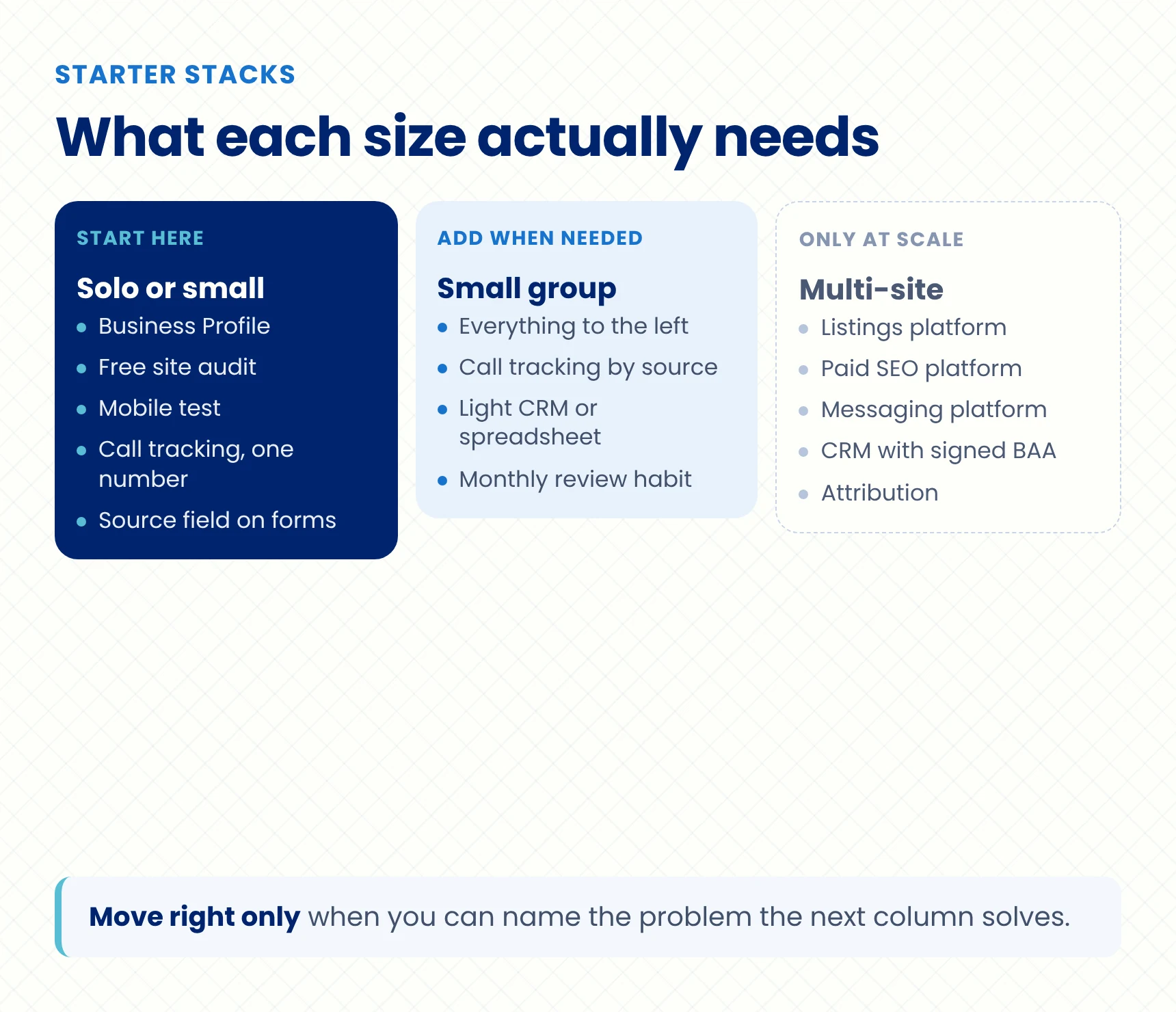
Rough guidance on which healthcare marketing tools suit which size, not a prescription. The jump between columns should be driven by a problem you can name, not by growth ambition.
| Job | Solo or small practice | Small group | Multi-site or hospital |
|---|---|---|---|
| Local presence | Business Profile, free review link | Same, managed weekly | Listings management platform |
| Site health | Free audit and mobile test | Same, quarterly | Paid SEO platform |
| Phone | Call tracking on one number | Call tracking by source | Call tracking plus call review |
| Messaging | Practice management system | Practice management system | Dedicated messaging platform |
| Pipeline | Nothing, or a spreadsheet | Spreadsheet or light CRM | CRM with a signed agreement |
| Measurement | Analytics plus source field | Same, reviewed monthly | Analytics plus attribution |
What practices overbuy
Three things, consistently.
- Enterprise platforms for small practices. A three-chair dental practice does not need a marketing automation suite. The licence is the cheap part; the expensive part is the months spent configuring it and the staff member who becomes its unpaid administrator.
- Attribution software instead of a source field. Practices pay monthly to solve a problem that a question at the front desk and a dropdown on a form would mostly solve.
- A second tool to fix the first tool. When two systems do not talk, the instinct is to buy a connector. Sometimes correct, often a sign the original choice was wrong.
Run an audit of what you pay for once a year. Open the bank statement rather than your memory, because forgotten subscriptions are forgotten precisely because nobody looks. Setting a healthcare marketing budget once a year, rather than approving each subscription as it appears, is easier when it sits inside planning your healthcare marketing.
Free tools worth setting up before you pay for anything
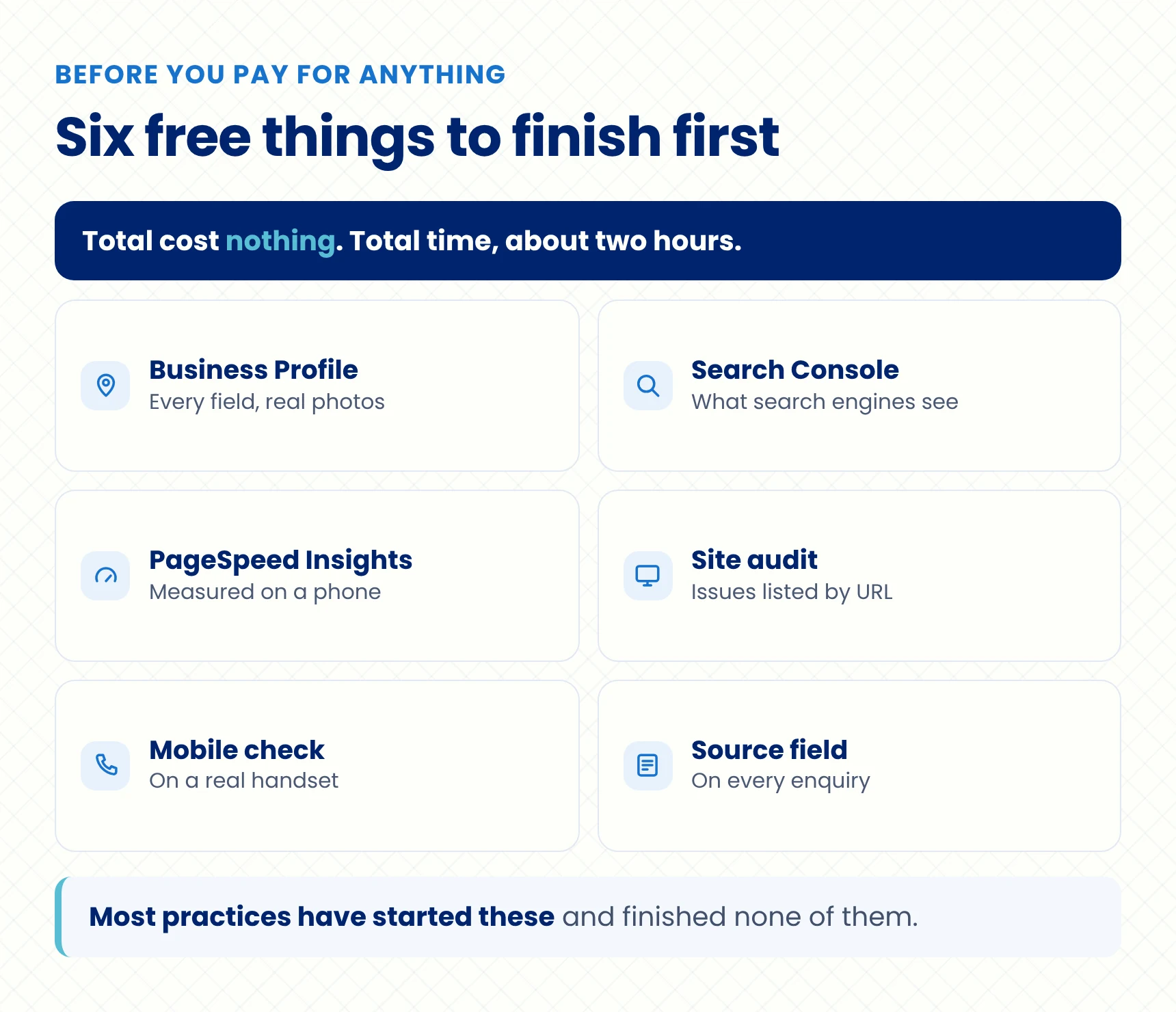
If you did only this list and nothing else, most practices would be better off than they are now.
None of that costs anything beyond a couple of hours. It also tells you what your real problems are, which makes the next purchase a much better decision.
When the answer is help rather than more software
A tool does a job, but somebody still has to do the work. Practices that struggle with marketing usually do not have a software gap. They have nobody whose job it is to look at the numbers on a Monday and change something.
If you are weighing a platform against an agency, compare them honestly: the platform plus the staff time to run it, against the outside help plus whatever you still need in house. Our list of questions to ask a marketing agency is worth reading before either decision, since the same questions expose both.
We work only with healthcare organisations, so the compliance questions above are part of how we set things up rather than something discovered later. In practice the first thing we do for a new client is usually subtraction. There is almost always something being paid for twice, something collecting patient information that should not be, and something nobody has logged into since it was installed.
That subtraction step is usually worth more than anything we add in the first month. It also makes the real gaps obvious, which is a better basis for spending than a feature comparison.
Our digital marketing services for healthcare cover the setup and the running of it: site health, local search, advertising, patient lead generation, call tracking and the reporting that connects them. We also review stacks that someone else built, which is often the cheaper place to start.
Frequently asked questions
What healthcare marketing tools does a small practice actually need?
A complete Google Business Profile, call tracking, a booking method that writes into your schedule, and a source field on every enquiry. Most practices can run well on that plus free analytics for a long time.
Is Google Analytics HIPAA compliant for a medical practice?
Google states it makes no representations that Google Analytics meets HIPAA requirements and does not offer a business associate agreement for it. Covered practices should keep it off booking, portal and symptom checker pages.
Which healthcare marketing tools will sign a business associate agreement?
Twilio, CallRail, HubSpot and parts of Google Workspace and Google Cloud all publish that they will, each with conditions on plan, account type or which features are covered. Mailchimp does not offer one.
Are AI healthcare marketing tools worth paying for yet?
For drafting and research, often yes, with human review before anything about care is published. For AI search visibility, most products are rank trackers with a new label, so spend on content structure first.
What is the best ROI tracking tool for healthcare marketing campaigns?
Usually the combination of call tracking and your practice management system rather than a dedicated platform. The number that matters is cost per attended appointment, and only your schedule knows who attended.
Do I need a healthcare CRM or is my practice management system enough?
For a single location with short booking cycles, the practice management system is normally enough. A CRM earns its place with long decision cycles, several locations or high value treatments needing structured follow-up.
How many marketing tools should a practice be paying for?
Fewer than most are. If a tool has no named owner, has not been opened this month, or duplicates something you already have, it is a candidate for cancellation at renewal.
Can I use Mailchimp for patient emails?
It is fine for general newsletters to people who opted in. It is not suitable for anything naming a patient’s condition, appointment or treatment, because no business associate agreement is offered.
What free healthcare marketing tools are worth using?
Google Business Profile, Search Console, PageSpeed Insights, Tag Manager and Looker Studio, plus a site audit, a mobile check and a direct review link. Set those up properly before buying anything paid.
How do I check whether a marketing tool is safe for patient data?
Read the vendor’s own published terms rather than the sales page, look for the agreement and its conditions, and confirm which features and integrations are covered. If they are vague, treat that as the answer.
Where to start if you only do one thing
Print your last bank statement and list every one of your healthcare marketing tools on it, with a name beside each one for who uses it and what it is for. Most practices cannot complete that list, and the gaps are the answer.
Then set up the free things on the checklist above before replacing anything. Fixing what you already pay for is almost always cheaper than buying the tool that promises to fix it.